
TimeHut - Baby Album
Bithouse Inc.Parenting
4.41.60K Reviews
- Version
- 8.3.6.2
- Installs
- 1.00M
- Age Rating
- Everyone
Screenshots
Our Review of TimeHut - Baby Album
 Analysis by Appyee
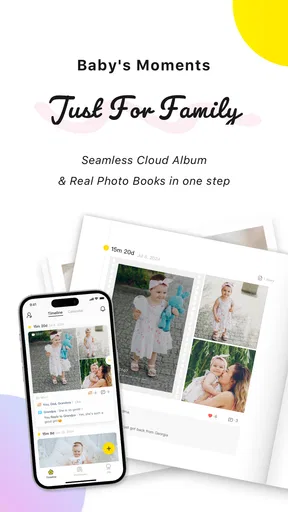
When I think about recording a baby’s early years, the difficult part is rarely finding a camera; it is keeping small memories from getting scattered among phone photos, messages, and half-remembered notes. TimeHut - Baby Album is built around that specific parenting task: collecting pictures and milestones in a dedicated album. I see its strongest appeal in giving those moments a place of their own, while its usefulness depends on whether its layout and routine fit the way you and your family like to remember things.
A focused home for everyday memories
TimeHut is a free parenting app from Bithouse Inc., and its central idea is straightforward: make a baby album that can hold photos, notes, and milestone memories together. The app has a 4.4 average from around 84,000 ratings, and it has been installed over a million times. Those figures suggest that plenty of families have tried it, but they cannot tell you whether its particular approach will suit your household. I would judge it by a more practical question: does it make you more likely to save a memory you would otherwise leave buried in your camera roll?
That distinction matters because a dedicated baby album is not the same thing as a general photo backup. A backup is useful for keeping files, but it does not necessarily make it easy to look back by age, event, or personal note. TimeHut’s timeline and milestone approach gives parents a more intentional way to connect an image with the story around it. If you mainly want to store every photo automatically, a standard gallery or cloud service may feel simpler. If you want a keepsake that explains why a picture matters, a purpose-built album is more compelling.
Readability and navigation in a busy routine
The first thing I noticed when downloading the app was its clean and user-friendly interface. Setting up the app is as easy as pie. After creating your account, you’re greeted with a welcoming dashboard that guides you through uploading your first photos. That guided start is helpful when you are tired or holding a baby and do not want to spend time learning a complicated filing system.
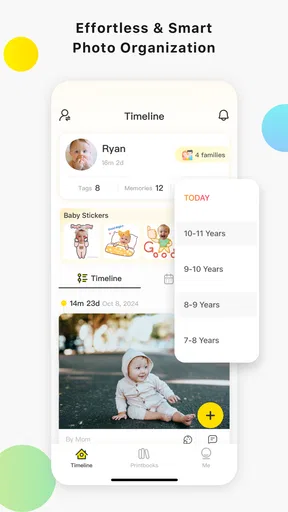
The timeline view is the most useful organizing idea. It gives photos and milestones a sense of sequence, so the album can be revisited as a developing story rather than a loose collection. I would use it to add context while an event is still fresh: a short caption about a funny expression or a note about what happened that day can be more meaningful later than a large batch of unlabeled pictures.
There is a trade-off in any timeline-led tool: its value grows when you keep up with it. If you leave months of photos untouched, organizing them later can feel like another parenting chore. A gentle workflow is to add only a few especially meaningful images at a time, then attach a brief note or milestone while the details are easy to remember. That keeps the album personal without turning it into a daily assignment.
Milestones, personalization, and the story behind a photo
One of my favorite features is the timeline view. It’s like a gentle stroll down memory lane, allowing you to see your baby’s journey from day one. You can easily add photos, notes, and even short videos to each milestone. It’s perfect for parents who want to keep everything organized without feeling overwhelmed.
What really sets TimeHut apart from other baby album apps is its thoughtful features. Let’s dive into some of the standout elements:
- Interactive Milestones: You can add predefined milestones or create your own. From first steps to first words, everything is customizable to fit your little one’s unique journey.
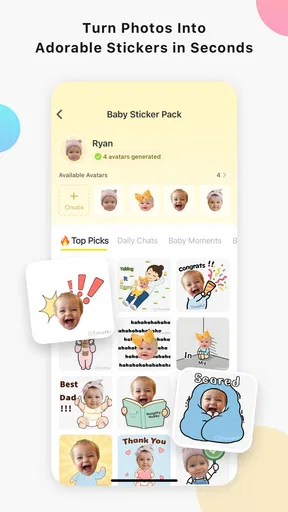
- Photo Filters and Editing Tools: Want to add a touch of magic to your photos? TimeHut offers a variety of filters and editing tools that are easy to use and perfect for enhancing those adorable snapshots.
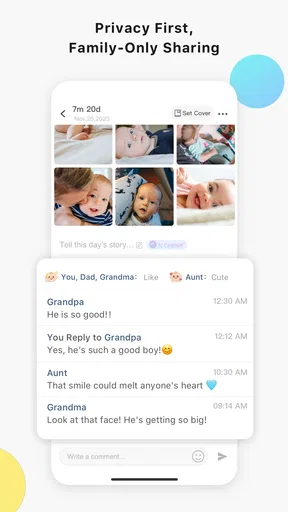
- Secure Sharing Options: Privacy is paramount for any parent. TimeHut allows you to share your baby’s album with family and friends securely through invitation links or keep it private, just for you.
Custom milestones are especially valuable when a family does not want its record to be limited to a standard list of firsts. You can make space for a small but meaningful event that matters to your child or household. My practical tip is to keep milestone titles specific enough to jog your memory later; a personal detail is more useful than a vague label when you revisit the album years on.
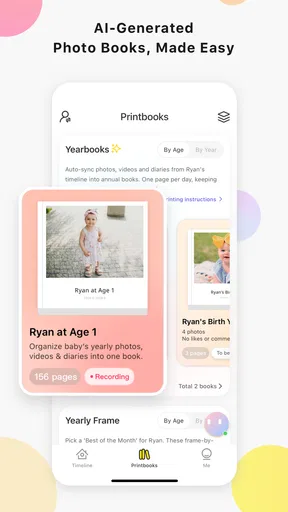
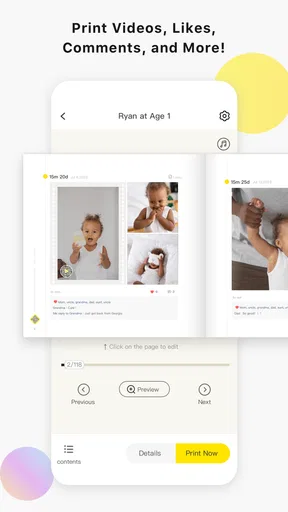
TimeHut encourages creativity. Whether you’re a seasoned scrapbooker or just getting started, the app offers plenty of options to personalize your album. You can choose from various themes and layouts, making each page a reflection of your baby’s personality.
For those who love to add a personal touch, there’s an option to write notes and captions. This can be a fun way to document little anecdotes or special messages you want to remember. Plus, you can track growth and development with the growth chart feature, which is both practical and endearing.
That mix of keepsake and practical record is useful, but I would treat personal notes as memory aids rather than a substitute for formal health records. A growth chart can help a parent keep a visual record, while medical questions and clinical measurements belong in the appropriate care conversations and records. Keeping those purposes separate prevents a charming scrapbook from being asked to do a job it was not designed for.
Different abilities and ways of using the app
For families with different levels of comfort using a phone, a guided dashboard and a visual timeline can be easier to approach than a folder system with many nested categories. Photos are a familiar starting point, and short captions let someone contribute without needing to write a long diary entry. At the same time, a person who finds small touch targets, busy screens, or prolonged scrolling tiring may find any photo-heavy app demanding. I would try a short session first and see whether adding one image feels comfortable before committing to a larger archive.
There is also a sensory and motor trade-off in the very nature of photo editing. Filters and layout choices can make a page feel personal, but extra decisions and repeated tapping may slow down a parent who simply wants to save a moment quickly. My suggestion is to decide on a simple style and use it consistently; the value is in the memory and its context, not in perfecting every page. For someone who prefers minimal interaction, a plain shared album or a few printed photos may be a better fit.
A realistic use case is a relative who lives far away and wants to follow a child’s milestones without relying on scattered family messages. A parent can add a photo and a short explanation when there is a quiet moment, then share the album through the app’s invitation option. That is more organized than repeatedly sending individual pictures, though it also asks relatives to use the same service and the parent to manage what gets shared. For a family that prefers face-to-face updates or a single group chat, that extra step may not be worthwhile.
Sharing, access, and practical limits
One of the things I appreciate most about TimeHut is its seamless integration with other platforms. You can import photos directly from your phone’s gallery, social media, or cloud services. This makes it incredibly convenient to gather all your memories in one place without the hassle of manual uploads.
The app is available on both Android and iOS, ensuring that you can access your baby’s album anytime, anywhere. The synchronization feature keeps everything updated across all your devices, so you’re never out of touch with your little one’s milestones.
Those options make it easier to bring existing pictures into a dedicated album, but moving memories into one place still benefits from a little planning. I would start with a small, recognizable group—perhaps a recent outing or an important milestone—rather than trying to sort the entire camera roll in one sitting. This is a useful way to see whether the timeline and album style work for you before investing time in a full archive.
Sharing a child’s images is a personal choice, not just a convenience setting. The app’s private and invitation-based options give families a way to limit an album to people they choose, but I would still agree with relatives about what they may save or pass along. A private album is most useful when everyone involved understands the same boundaries. If your priority is avoiding digital sharing altogether, a physical album or a local photo collection is the clearer option.
TimeHut is free to download, with in-app purchases ranging from $0.99 to $99.99 per item. I would begin with the free experience and decide whether the basic routine is genuinely useful before spending on anything. It is intended for everyone, and the current version is 8.3.3.1, with Android 7.0 or later required. The app was released on September 21, 2012, so it has had a long presence in this space; what matters most to a new user, though, is whether the current interface works comfortably on their own device.
Who will get the most from it?
I would recommend trying TimeHut if you want a baby-focused place for photos, little stories, and milestones, especially if family members would enjoy sharing a curated record. It suits parents who like marking occasions and adding personal context, but it may be less appealing if you already have a reliable album habit or dislike maintaining a second photo collection. The ordinary phone gallery is faster for casual storage, while a printed scrapbook offers a more tactile experience and does not depend on relatives adopting an app. TimeHut sits between those choices: more structured than a camera roll, less hands-on than crafting a physical book.
It is also worth considering who will do the upkeep. If one parent is expected to document everything, the album can become an uneven record and an unwanted obligation. Sharing the task—one person adding photos, another writing occasional notes—can make the keepsake feel more like a family effort. If that division is unrealistic, choose a low-maintenance approach and save only the moments you would genuinely want to revisit.
A keepsake only works if it fits your family
In a world where time flies by in the blink of an eye, TimeHut - Baby Album offers a charming and efficient way to capture the moments that matter most. It’s more than just an app; it’s a companion for your parenting journey, helping you preserve memories that will be cherished for years to come.
If you’re looking for an intuitive and heartwarming app to document your baby’s early years, TimeHut is definitely worth exploring. So grab your phone, download the app, and start creating a beautiful legacy for your little one. Trust me, you’ll thank yourself later when you’re flipping through those digital pages, reliving every smile and giggle.
My inclusive verdict
My overall view is that TimeHut has a clear purpose and a welcoming, visual way to support a family memory-keeping routine. The timeline, custom milestones, captions, and sharing choices can help different relatives contribute in their own way, but they do not remove the need to manage the album or make decisions about private photos. I would try it with a few meaningful entries and invite only the people who will use it thoughtfully. If that small test feels comfortable and useful, it can become a lovely record; if it feels like another task or creates friction for someone in the family, a simpler gallery or a physical album is a perfectly sensible alternative.
Verdict
Strengths of TimeHut - Baby Album
- Intuitive interface for easy navigation.
- High-quality photo and video uploads.
- Customizable album themes.
- Secure cloud backup for data safety.
- Collaborative sharing with family members.
Limitations of TimeHut - Baby Album
- Limited storage in free version.
- No offline editing capabilities.
- Occasional sync delays reported.
- In-app purchases can be pricey.
- Requires constant internet connection.
Similar Picks in This Category
View All
Family Space
Motorola Mobility LLC.3.9

شرطة الأطفال - مكالمة وهمية
Oub Apps4.1

Findmykids: Parental Control
LETEM LTD4.6

Pregnancy + | Tracker App
Philips Electronics UK Limited4.8

Policía de niños - para padres
Kids police4.7

Pregnancy App
Amila4.9
Frequently Asked Questions
What is TimeHut - Baby Album and how does it work?
TimeHut - Baby Album is a mobile app designed to help parents document and cherish their baby's milestones and precious moments. The app allows you to create a digital album, organize photos and videos, and add captions or notes to each moment. It also features easy sharing options, so you can keep family and friends updated on your baby’s growth.
Is TimeHut - Baby Album free to use?
The basic version of TimeHut - Baby Album is available for free, providing essential features like photo storage and album creation. However, there are in-app purchases and subscription options that unlock premium features such as additional storage, exclusive templates, and advanced sharing options. Check the app store for specific pricing details.
How secure is my data on TimeHut - Baby Album?
TimeHut - Baby Album prioritizes user privacy and data security. The app employs encryption to protect your photos and personal information. It’s important to read their privacy policy to understand how data is handled. Regular updates also ensure security features are up to date. Always use strong passwords and enable any available security settings.
Can I access my TimeHut - Baby Album on multiple devices?
Yes, TimeHut - Baby Album supports multi-device access. You can log into your account from various devices, allowing you to view and update your album wherever you are. Ensure all devices are connected to the internet to sync changes seamlessly. This feature is especially useful for families wanting to share access.
What kind of customization options are available in TimeHut - Baby Album?
TimeHut - Baby Album offers a variety of customization options to personalize your baby’s album. You can choose from different album themes, add captions and notes to each photo, and create custom stories. Premium users have access to exclusive templates and design features, allowing even more personalization to match your style.
